

Skip to content
← All apps
Bouncer app icon: a bald bouncer in a tuxedo, tiny robots reflected in his sunglasses

Bouncer

macOS · Free beta

The club's full.
Your agents wait at the door.

Bouncer is a menu bar app for Macs that run several coding agents at once. It watches memory pressure and swap, and when the Mac is overloaded it holds Claude Code and Codex before their next tool call. When there is room again, they continue on their own. Nothing gets killed.

Download Bouncer for Mac

macOS 14 or later · Apple silicon · free beta

Version 0.1.0-beta.1 · 5.5 MB

  • Signed and notarized
  • Fails open
  • No account, no telemetry
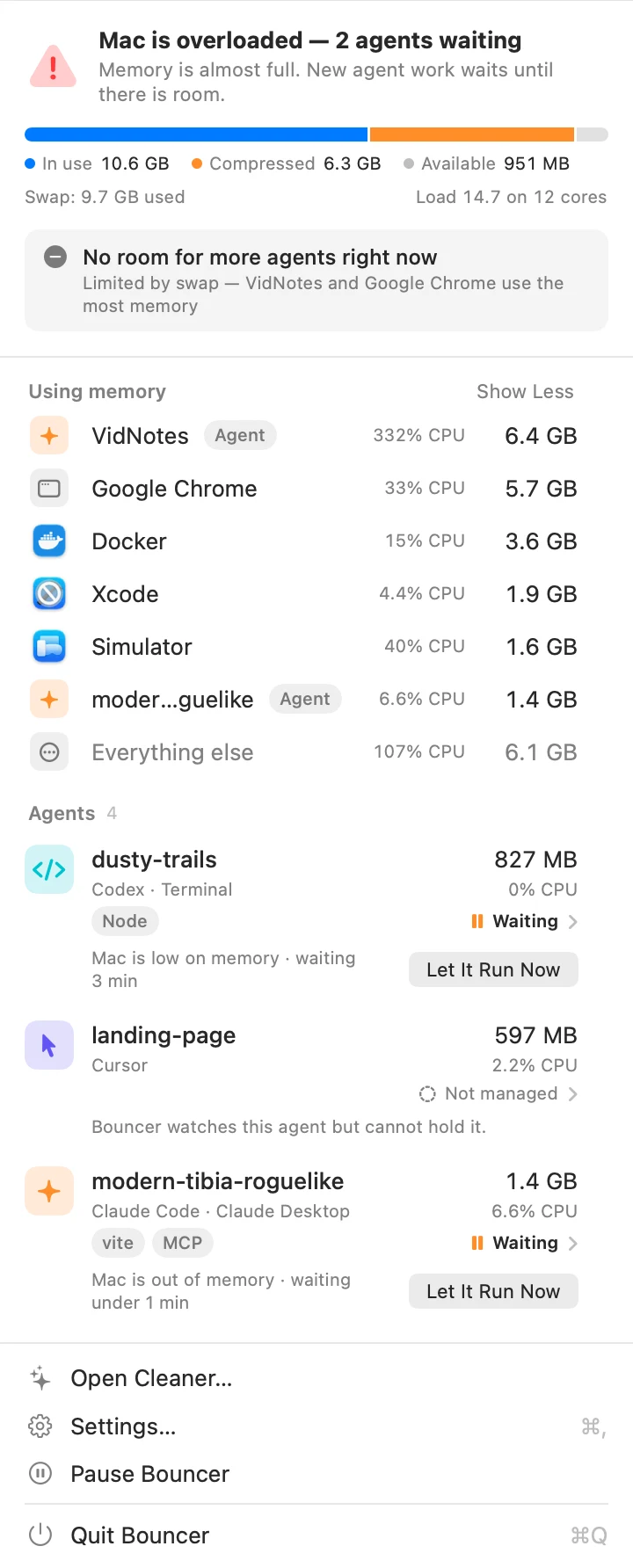
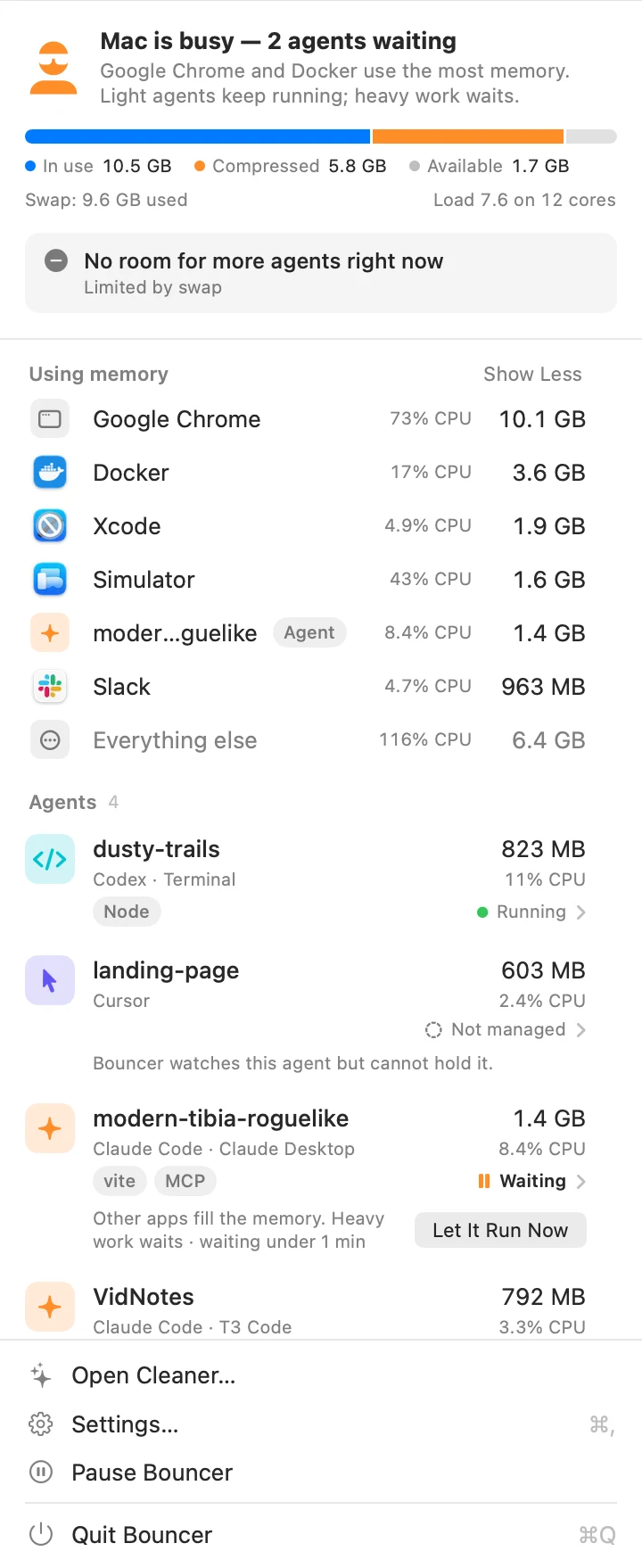
Bouncer popover: Mac is overloaded, 2 agents waiting. The memory bar is almost full and two agent rows say Waiting with a Let It Run Now button.

32 seconds, sound on.

Agents plus swap equals a frozen Mac

One agent is cheap. Claude Code or Codex that only edits files and runs small commands uses 200 to 500 MB. The trouble starts when four of them each start a dev server, and one kicks off an Xcode build. This is what my 18 GB M3 Pro looked like before Bouncer.

20 GB

of swap on an 18 GB MacBook

Four agent sessions, two vite dev servers, an iOS build and a simulator. Each one alone is fine.

Load 15

on 12 cores

The agents keep calling tools. Every tool call starts another process that needs memory the Mac no longer has.

Wait

was the only option

Kill an agent and you lose its context. Keep going and the mouse pointer stutters. Both are bad.

How the door works

A hook in each agent asks Bouncer before every tool call. Most of the time the answer takes a millisecond and nobody notices. When the Mac is full, the answer is "wait".

1. It watches

Memory pressure, swap and CPU, sampled every few seconds, plus the process tree of each agent: the agent itself, its dev servers, builds and simulators. It learns what each kind of work costs on your Mac.

2. It holds

When the Mac is overloaded, a hook asks Bouncer before each tool call. Bouncer tells the newest agents to wait. The one you worked with last keeps running. Nothing is frozen or killed.

3. It lets them in

When one more agent fits, the one that waited longest continues. One at a time, so the Mac does not fall over again. A hold ends after 20 minutes at most, even if the Mac is still busy.

The Bouncer menu bar item in its states: outlined bouncer while the Mac has room, solid bouncer with a count while agents wait, a warning triangle when overloaded, a pause circle while paused
The menu bar item. Outlined while the Mac has room, solid with a count while agents wait, a triangle when the Mac is overloaded.

Nothing gets frozen. Nothing gets killed. Agents wait at the door and walk in when there is room. 

What the bouncer sees

One popover. Memory, swap and load at the top, then who uses the memory, then each agent with its project, host, workload and state. Demo data shown.

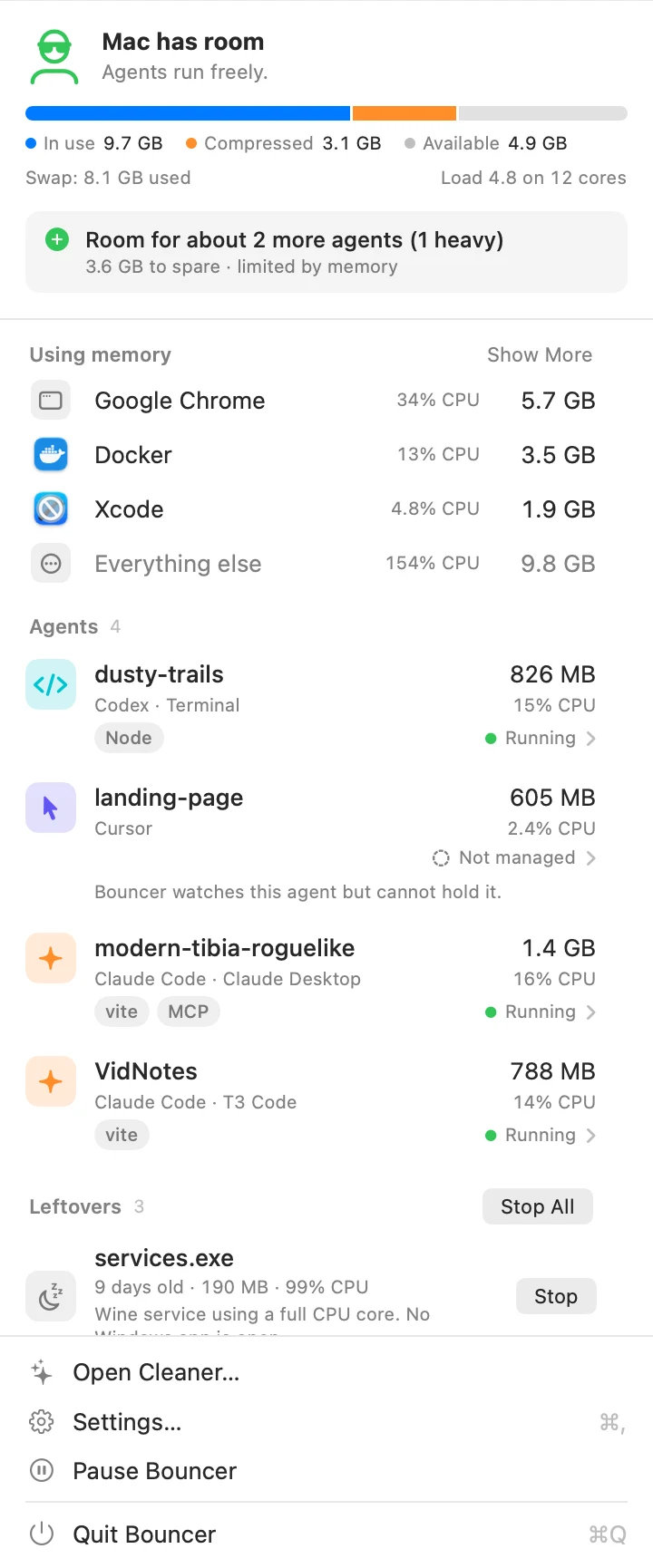
Bouncer popover: Mac has room, room for about 2 more agents, four agent sessions running
Room for about 2 more agents. Start them.
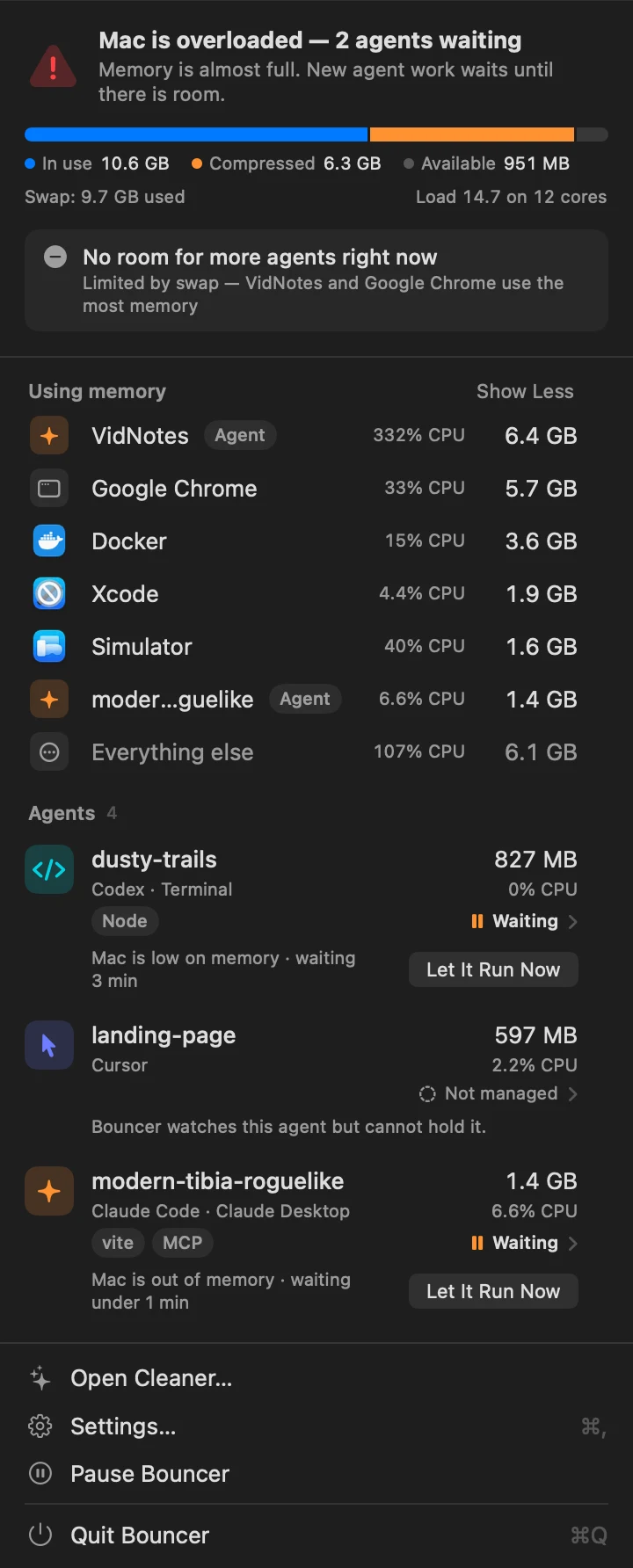
Bouncer popover in dark mode: Mac is overloaded, 2 agents waiting, memory bar almost full, 9.7 GB of swap
Overloaded. Two agents wait at their next tool call.
Bouncer popover: Mac is busy because Google Chrome and Docker use the most memory, light agents keep running
Chrome ate the memory. Light agents keep running.

What you get besides a closed door

Who is really using the memory

Apps with their helpers, Docker with its VM, Xcode with its build tools, and each agent session as one row. The number is the physical footprint, swap included, the same one Activity Monitor shows.

Room for about N more agents

Before you start another session, the headroom line tells you how many light and heavy ones still fit. It uses what Bouncer learned about your builds, not a guess.

When Chrome is the problem, not your agents

Holding an agent frees nothing if a browser holds 19 GB. By default Bouncer then lets light agents run and holds only builds, simulators, Docker and dev servers. You can set it to never hold, or always.

Fails open, always

If Bouncer is not running or the socket is gone, the hook lets the agent continue within a second. Every hold has a time limit. You can also let one agent run now with one click.

Leftovers from finished agents

A vite server whose agent quit hours ago. A Wine service at 99% CPU with no app open. Bouncer lists them with their age and memory, and stops the ones you pick.

Nothing leaves your Mac, except a version check

No account, no telemetry. Once a day the app asks pawelkarniej.com for a new version and sends only its own version number; you can turn that off in Settings. Settings and learned footprints live in one folder under Application Support. The app is signed with a Developer ID and notarized by Apple.

The cleaner

The club also takes out the trash

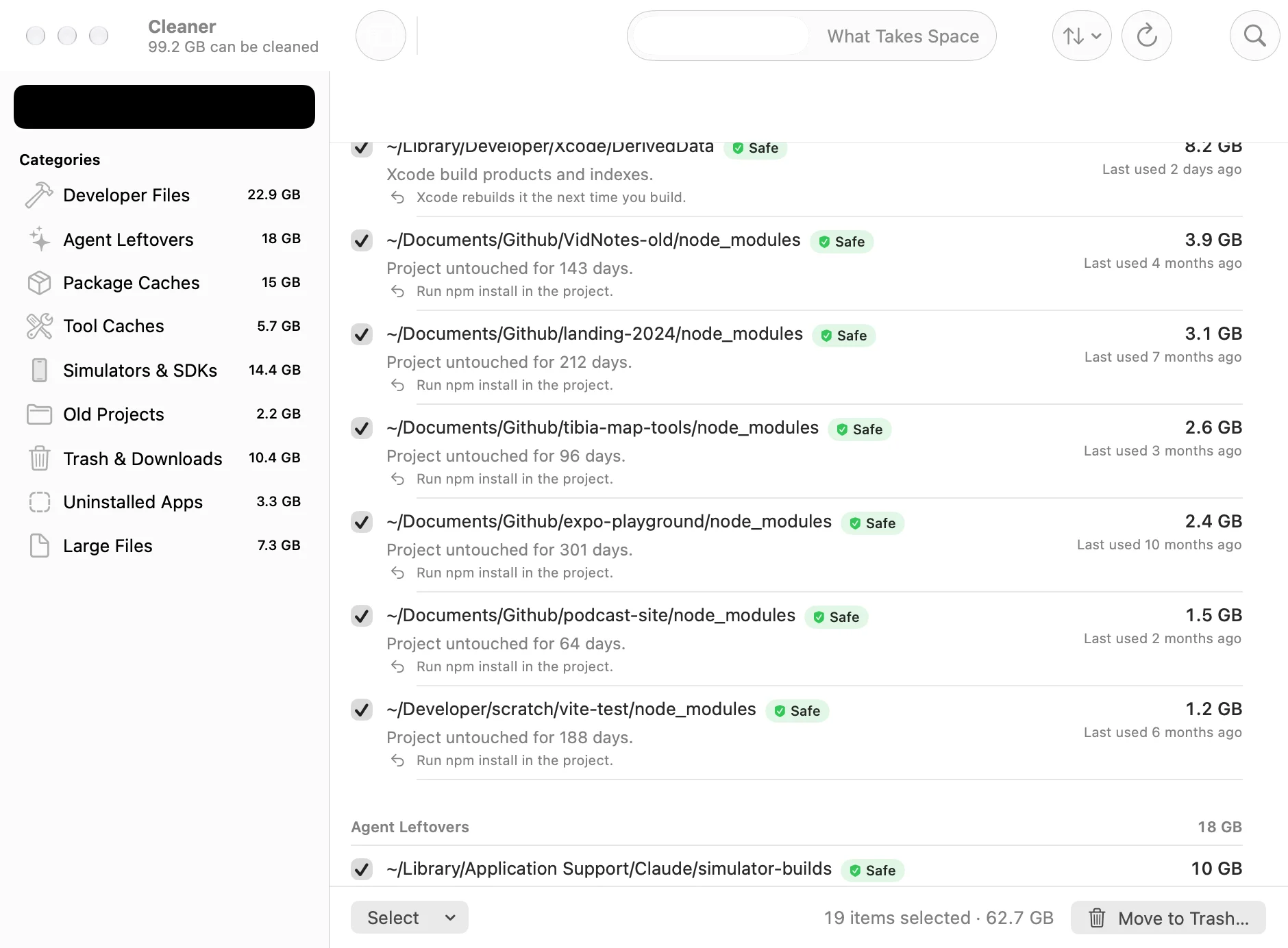
Agents leave a mess behind. Generic Mac cleaners do not know what a Codex session or a Claude simulator build is. Bouncer does. Each item comes with a reason, a safety level and how it comes back.

  • Nested node_modules in projects untouched for 30 days
  • Xcode DerivedData, SwiftPM .build folders and SourcePackages
  • Claude Desktop simulator builds and old Codex sessions
  • Agent worktrees whose branches are pushed, with their Git state spelled out
  • Unavailable simulator devices and superseded iOS runtimes
  • npm, Gradle, CocoaPods, SwiftPM and Playwright caches
  • Data of apps you uninstalled, Downloads older than 90 days, files over 1 GB

Nothing goes anywhere until you tick it and confirm. Everything goes to the Trash, never straight to deletion. A project with uncommitted changes, unpushed commits or a stash is never offered as safe.

Bouncer Cleaner window: categories in a sidebar with sizes, and a list of node_modules folders and DerivedData marked Safe, each with the reason and how it comes back. 19 items selected, 62.7 GB.
Clean Up: what can go, why, and what brings it back.
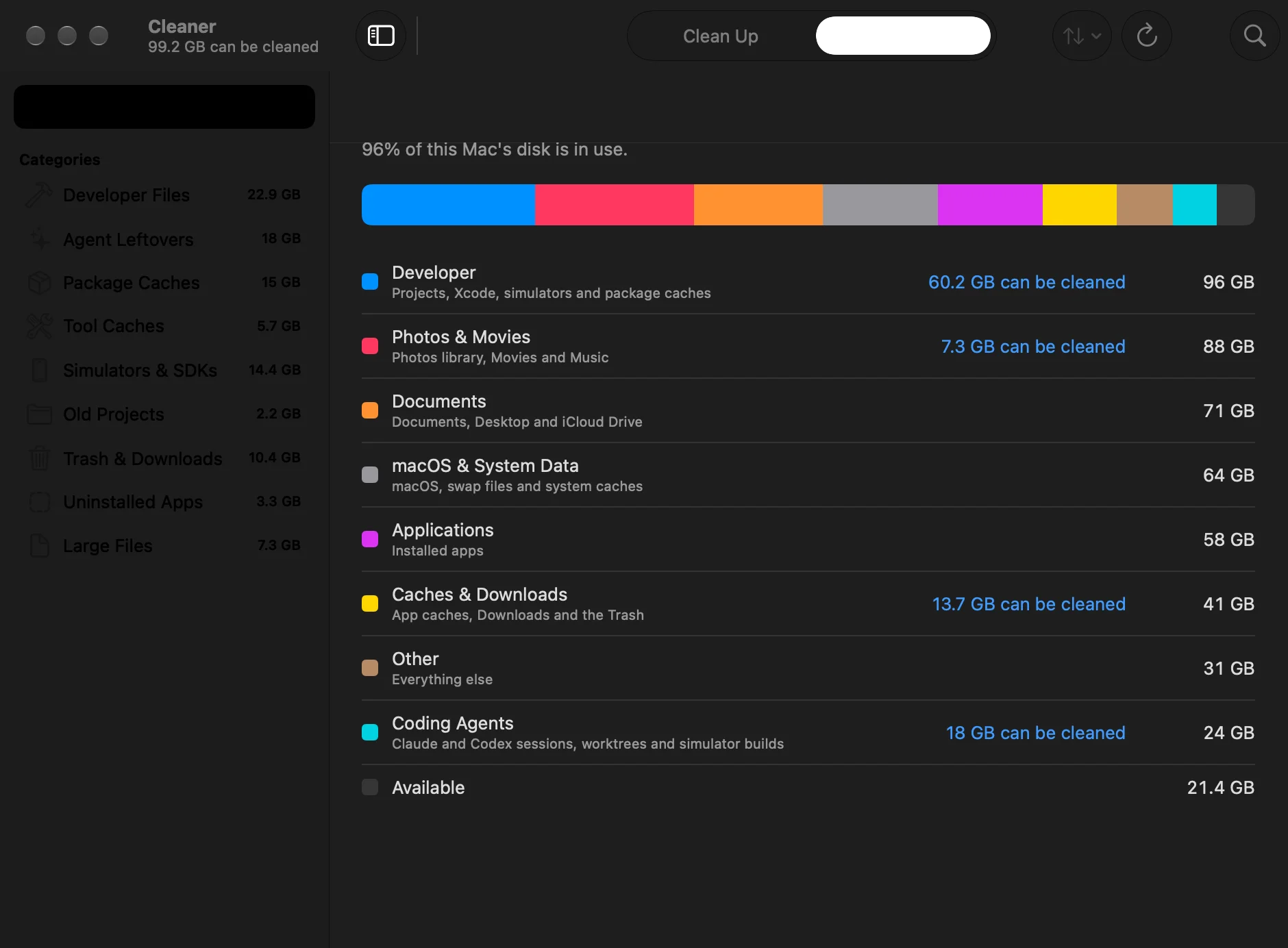
Bouncer Cleaner, What Takes Space view: a stacked bar of the disk by kind, with Developer at 96 GB and Coding Agents at 24 GB, and how much of each can be cleaned
What Takes Space: the disk by kind, with a link into each cleanup.

Questions people ask before they let it near their agents

Is it safe to run?

Bouncer only ever pauses an agent at a hook boundary, before its next tool call. Every hold ends after 20 minutes at most and then fails open. The cleaner never deletes anything by itself: it moves what you tick to the Trash, it never preselects risky items, and it does not offer a project or worktree that has uncommitted changes, unpushed commits or stashes. The app is signed with a Developer ID and notarized by Apple.
Does it kill my agents?

No. A held agent keeps its process, its context and its terminal. The hook simply waits before the next tool call, then returns when there is room. Bouncer never sends SIGSTOP or SIGKILL to an agent. The only things it stops are the leftovers you click Stop on: dev servers and shells whose agent is already gone.

What does it change in my agents?

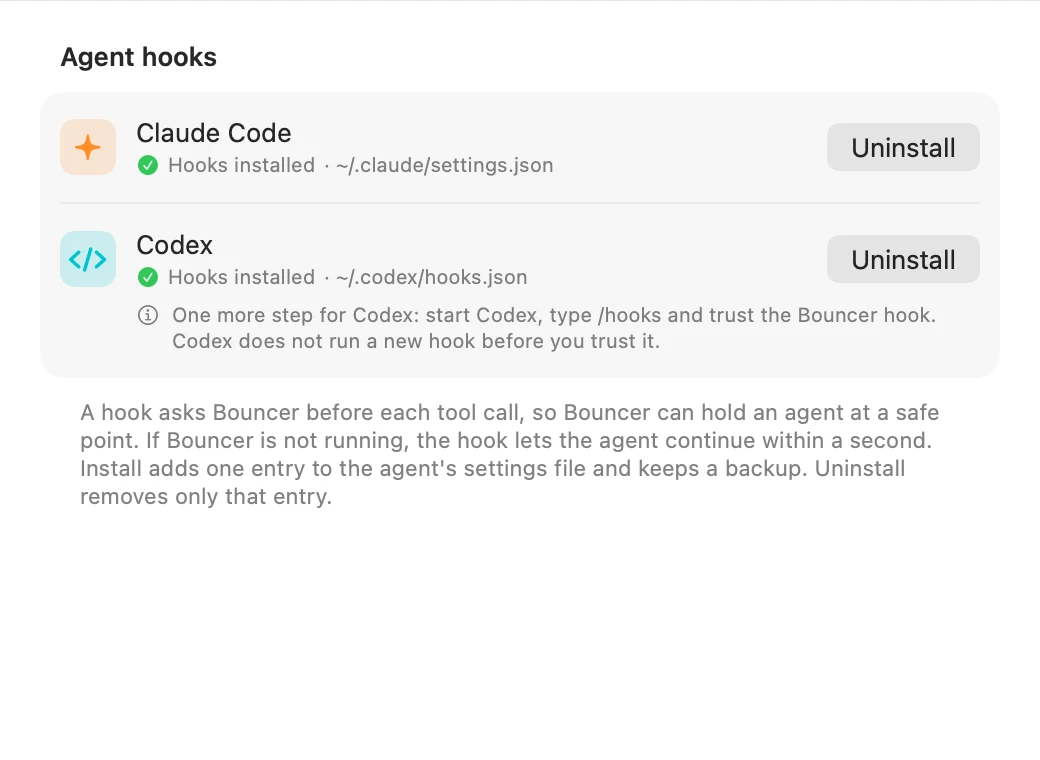
One hook entry. For Claude Code it is a PreToolUse hook in ~/.claude/settings.json, for Codex the same shape in ~/.codex/hooks.json. Both point at bouncer-gate inside Bouncer.app. Install keeps a timestamped backup and leaves your other hooks alone. Uninstall removes only that entry. If you move the app, Settings shows a Repair button. Codex asks you to trust the new hook once, with /hooks.

Does it send data anywhere?

Almost nothing. Bouncer checks pawelkarniej.com once a day for a new version. The request contains only the app version — no ID, no personal data. Counting these requests tells me roughly how many people use the beta. You can turn it off in Settings. Send Feedback… in the menu opens the contact page. That is all: no account, no telemetry. Locally it writes three files to ~/Library/Application Support/Bouncer: settings.json, footprints.json with what it learned about your workloads, and the gate.sock socket the hooks talk to. Notarization means Apple scanned the binary once, not that anything phones home.

Which agents does it hold?

Claude Code, wherever it runs (terminal, Claude Desktop, T3 Code, VS Code, Cursor), and the Codex CLI. Both support the hook Bouncer needs. Cursor's own agent and opencode show up in the list with their memory and CPU, but Bouncer cannot hold them, so their row says Not managed.

Will Bouncer itself slow my Mac down?

It is built to stay under 1% CPU and 80 MB of memory on average. It samples the system every few seconds and does nothing else while you are not looking at it. If it ever appears high in its own Using memory list, that is a bug and I want to hear about it.

Why is it a beta, and why free?

I built it for my own 18 GB M3 Pro, which ran out of memory every afternoon. The thresholds and the footprint learning have been tuned on that one machine. A beta means I want it on other Macs, with other agents and other builds, before I call it done. The beta is free. No account, no license key.

How do I uninstall it?

In Settings, Agents, select Uninstall for each agent. Switch off Open Bouncer at login. Quit Bouncer and move Bouncer.app to the Trash. Optionally delete ~/Library/Application Support/Bouncer. If a hook is still around with the app gone, the agent reports a hook error once and continues.

Five minutes to a quieter Mac

  1. 1

    Download the ZIP

    One file, signed with a Developer ID and notarized by Apple.

  2. 2

    Unzip and move Bouncer.app to Applications

    Do this before you install hooks. The hook stores the app's path.

  3. 3

    Open Bouncer

    The bouncer appears in the menu bar. There is no Dock icon. macOS asks once whether to open an app downloaded from the internet.

  4. 4

    Select Install Hooks

    In the welcome window or in Settings, Agents. For Codex, start Codex, type /hooks and trust the Bouncer hook.

  5. 5

    Start new agent sessions

    Sessions that were already open keep their old hook setup. New ones ask Bouncer before each tool call.

Bouncer Settings, Agents pane: Claude Code and Codex both show Hooks installed with the path of the settings file and an Uninstall button
Settings, Agents. Install, Uninstall and Repair per agent. One hook entry each, backed up before it is written.

Let the bouncer work the door

Free while in beta. Install the hooks, start your agents, and keep using your Mac while they work.

Download Bouncer for Mac

macOS 14 or later · Apple silicon · free beta

Version 0.1.0-beta.1 · 5.5 MB

Something broke, or a hold felt wrong? Tell me. Or go back to all apps.